
Backtesting In MT4: What You Should Know

KEY POINTS
Backtesting is pretty simple in MT4. At first, you have to place the system within the experts' directory of the MetaTrader platform. To access the location, head over to the main menu, click on 'file', and then 'open the data folder'.
KEY TAKEAWAYS
Backtesting is essential for traders looking to buy or sell expert advisors in the MetaTrader 4 (MT4) platform. The MetaTrader 4 platform has several functionalities such as timeframe, historical data, visual mode, tick model, modification expert, optimization, and expert properties that you can use to test systems.
The current era of the AI revolution has taken the internet by storm. The financial industry is no different. Many expert advisors in the marketplace claim to offer millions of dollars yet fail to deliver on the promise.
The MetaTrader 4 was first released in 2005 and has gone through multiple updates to cater to the needs of the mass trader. The MQL 5 marketplace is a standard hub for traders looking to buy/sell their expert advisors that work on the MT4 platform. Before purchasing any system, traders should thoroughly backtest them on the strategy tester in MT4.
Running these systems through complex testing can give you an insight into their efficiency. However, you need ample knowledge in reading these results.

Where is the strategy tester located?
Access the strategy tester in MT 4 using the following steps:
- Open the platform and click on the view button in the top menu
- Select the strategy tester from the dropdown
Alternatively, you can also use the hotkeys Ctrl+R to open up the strategy tester.
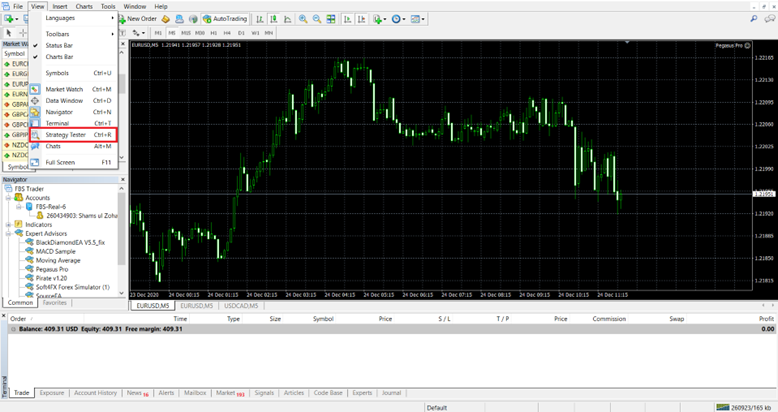
Image 2. The red box in the image highlights the strategy tester option in the main menu.
How to backtest your expert advisor?
Backtesting is pretty simple in MT4. At first, you have to place the system within the experts’ directory of the MetaTrader platform. To access the location, head over to the main menu, click on ‘file’, and then ‘open the data folder’.
In the designated folder, click on MQL 4 and then on experts. Place your file here and refresh the experts tab in the MT4 platform. Your algorithm will appear alongside other EAs.
Here is a designated list of functionalities MT4 has:
- Timeframe. Open the strategy tester and find the algorithm within the drop-down menu. There are six different time frames to choose from, i.e., M1, M5, M15, M30, H1, H1, and Daily. You can also adjust the spread value to your liking.
- Historical data. MT4 allows traders to set the designated duration to test the system. Historical data should be made available for the selected period. MT4 will download it automatically; however, in case of an error, you can also download it manually from the history center.
- Visual mode. The visual tester within MT4 can allow you to witness trades in real time on the chart as they happen. Remember that visual testing can be prolonged compared to regular backtesting as the bars require onscreen playback.
- Tick model. The most accurate backtesting is available with every tick model. This is also the most time-consuming. Traders can choose to test crude points or open prices only, which is much faster. The results of these two should not be considered authentic.
- Modify expert. The modify expert option opens up the MQL 4 coding interface. Traders can then adjust the coding parameters of their expert advisor. The option is only available if you have the MQL 4 file within the experts’ folder.
- Optimizing expert advisors is recommended to get the best-set file. It removes the need to manually modify each parameter before testing. Optimization can be hard on your PC, so ensure you have enough RAM and CPU power before starting one.
- Expert properties. You can adjust several settings within the expert advisor, for example, lot size, indicator values, stop loss, take profit, etc.
Reading the MT4 Backtesting Report
Reading the MT 4 report can give you information on important metrics such as drawdown, profit factor, average profitable trade, etc. Let’s look into some points that should be noted:
- There are two drawdown values, absolute and maximal. The first represents the drawdown value from the initial deposit, while the latter points to the drawdown value during the mid-trading phase.
- To ensure a positive balance at the end of the trading period, gross profit must exceed gross loss.
- Your EA can be accurately evaluated by analyzing its profit factor and win ratio. These metrics provide valuable insights into the algorithm’s ability to generate profits and win trades, respectively, and help determine its overall success in the market.
- Make sure that the modeling quality for the test is above 90
- The trading results can highlight the strategy of the bot. Head to the results section and check all the opened and closed trades for accurate analysis.
- The backtesting graph shows the balance and equity curves. If the equity curve separates from the balance, it confirms that the bot is using risky grid and martingale strategies.
Summing up
Backtesting is essential for traders looking to buy or sell expert advisors in the MetaTrader 4 (MT4) platform. The MetaTrader 4 platform has several functionalities such as timeframe, historical data, visual mode, tick model, modification expert, optimization, and expert properties that you can use to test systems. Traders should read the MT4 backtesting report to gain insights on metrics such as drawdown, profit factor, win ratio, modeling quality, and trading results. The information helps determine expert advisors’ efficiency and success before using them in the market.

About Soko Directory Team
Soko Directory is a Financial and Markets digital portal that tracks brands, listed firms on the NSE, SMEs and trend setters in the markets eco-system.Find us on Facebook: facebook.com/SokoDirectory and on Twitter: twitter.com/SokoDirectory

- January 2026 (220)
- February 2026 (248)
- March 2026 (287)
- April 2026 (208)
- May 2026 (191)
- June 2026 (238)
- July 2026 (279)
- August 2026 (136)
- January 2025 (119)
- February 2025 (191)
- March 2025 (212)
- April 2025 (193)
- May 2025 (161)
- June 2025 (157)
- July 2025 (227)
- August 2025 (211)
- September 2025 (267)
- October 2025 (297)
- November 2025 (230)
- December 2025 (220)
- January 2024 (238)
- February 2024 (227)
- March 2024 (190)
- April 2024 (133)
- May 2024 (157)
- June 2024 (145)
- July 2024 (136)
- August 2024 (154)
- September 2024 (212)
- October 2024 (255)
- November 2024 (196)
- December 2024 (143)
- January 2023 (182)
- February 2023 (203)
- March 2023 (322)
- April 2023 (297)
- May 2023 (267)
- June 2023 (214)
- July 2023 (212)
- August 2023 (257)
- September 2023 (237)
- October 2023 (264)
- November 2023 (286)
- December 2023 (177)
- January 2022 (293)
- February 2022 (329)
- March 2022 (358)
- April 2022 (292)
- May 2022 (271)
- June 2022 (232)
- July 2022 (278)
- August 2022 (253)
- September 2022 (246)
- October 2022 (196)
- November 2022 (232)
- December 2022 (167)
- January 2021 (182)
- February 2021 (227)
- March 2021 (325)
- April 2021 (259)
- May 2021 (285)
- June 2021 (272)
- July 2021 (277)
- August 2021 (232)
- September 2021 (271)
- October 2021 (304)
- November 2021 (364)
- December 2021 (249)
- January 2020 (272)
- February 2020 (310)
- March 2020 (390)
- April 2020 (321)
- May 2020 (335)
- June 2020 (327)
- July 2020 (333)
- August 2020 (276)
- September 2020 (214)
- October 2020 (233)
- November 2020 (242)
- December 2020 (187)
- January 2019 (251)
- February 2019 (215)
- March 2019 (283)
- April 2019 (254)
- May 2019 (269)
- June 2019 (249)
- July 2019 (335)
- August 2019 (292)
- September 2019 (306)
- October 2019 (313)
- November 2019 (362)
- December 2019 (318)
- January 2018 (291)
- February 2018 (213)
- March 2018 (275)
- April 2018 (223)
- May 2018 (235)
- June 2018 (176)
- July 2018 (256)
- August 2018 (247)
- September 2018 (255)
- October 2018 (282)
- November 2018 (282)
- December 2018 (184)
- January 2017 (183)
- February 2017 (194)
- March 2017 (207)
- April 2017 (104)
- May 2017 (169)
- June 2017 (205)
- July 2017 (189)
- August 2017 (195)
- September 2017 (186)
- October 2017 (235)
- November 2017 (253)
- December 2017 (266)
- January 2016 (164)
- February 2016 (165)
- March 2016 (189)
- April 2016 (143)
- May 2016 (245)
- June 2016 (182)
- July 2016 (271)
- August 2016 (247)
- September 2016 (233)
- October 2016 (191)
- November 2016 (243)
- December 2016 (153)
- January 2015 (1)
- February 2015 (4)
- March 2015 (164)
- April 2015 (107)
- May 2015 (116)
- June 2015 (119)
- July 2015 (145)
- August 2015 (157)
- September 2015 (186)
- October 2015 (169)
- November 2015 (173)
- December 2015 (205)
- March 2014 (2)
- March 2013 (10)
- June 2013 (1)
- March 2012 (7)
- April 2012 (15)
- May 2012 (1)
- July 2012 (1)
- August 2012 (4)
- October 2012 (2)
- November 2012 (2)
- December 2012 (1)